















































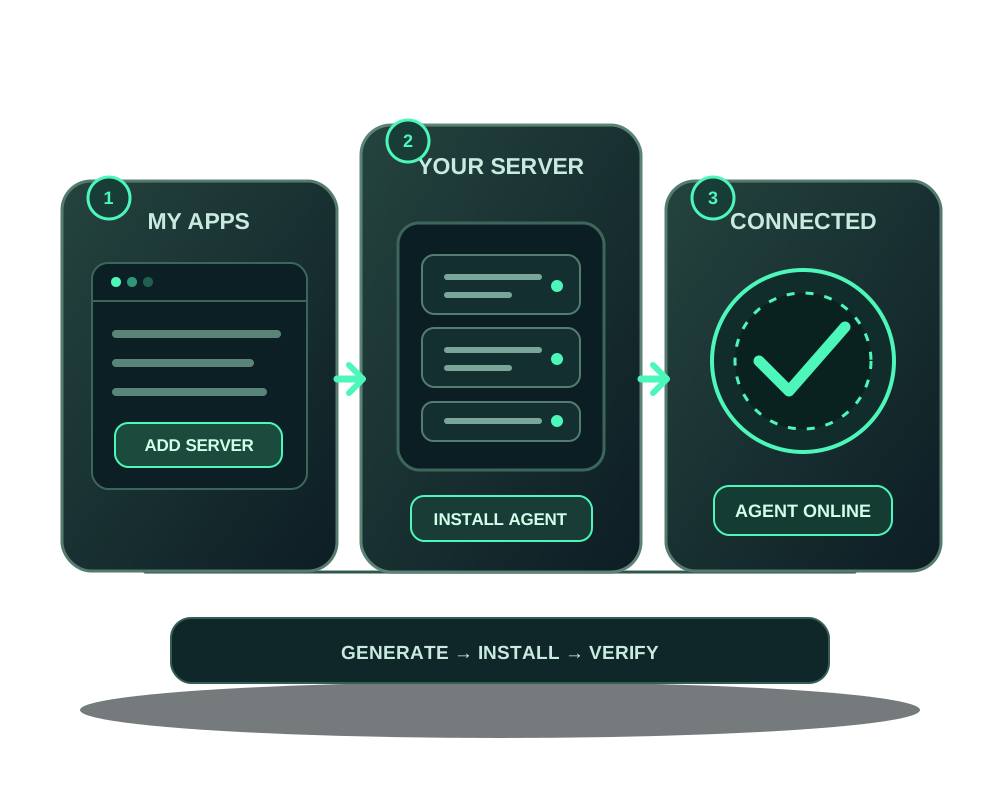
You can connect a compatible VPS or dedicated server from another host to the Impreza app platform. The connection starts with the Impreza Agent on a machine you administer. It does not move your hosting contract, copy existing apps or migrate databases.
Check your server and account
Use a compatible Linux system such as Debian, Ubuntu, RHEL or Alpine, with administrator access to install the Agent. Confirm that you control the server and can run the portal-generated installation command. Keep your existing host’s credentials private; adding a server to My Apps does not require giving Impreza your hosting account login.
Every account can connect its first external server for free, without a plan or account balance. Your existing provider still charges for its server, and backup storage or other services are separate. Check your current external-server allowance in My Apps before adding another machine; additional slots depend on your account’s platform tier. If you are just starting, you can create an account without an email address and safely store your Account ID and one-time recovery code.
Generate a fresh installation command
- Open My Apps in the client portal.
- Choose Bring your own server and copy the installation command generated for that connection.
- Run it on the server with the required administrator access. The bootstrap token in the command lasts ten minutes; generate a new command if it expires. Do not put the token in a public prompt, repository or ticket.
- Return to My Apps and wait until the Agent reports online. If it stays offline, inspect the installation result and server connectivity before deploying.
Use the command the portal provides for your account and server. A copied example from a guide cannot supply a valid bootstrap token. The technical MCP connection documentation describes the Agent prerequisite and the supported connection paths.
Request the command through your AI assistant
With current hosted MCP or local impreza-mcp 0.53.0+, an authenticated assistant with deploy scope can call impreza_add_server. Ask it to prepare the connection for the compatible Linux server you administer and to wait for your agreement before any installer runs. The tool returns the command; it does not run it on your machine automatically.
- Review the selected server and the installation command. This changes the host and needs administrator access.
- Run the command on that server yourself, or explicitly authorize your own automation for that host. Do not give the assistant your hosting account password just to generate it.
- Treat the command as a secret: its one-time installation token is displayed once and expires after 10 minutes. Do not paste it into a public prompt, repository or ticket. If it is lost or expires, request a fresh command.
- Ask the assistant to call
impreza_list_serversand wait for online before deploying. A generated command is not a connected server.
An unused installation token holds a server slot until it expires, and new registrations have a daily limit. Read the actual allowance and any refusal instead of generating repeated commands. This installation token is separate from an OAuth access token and from local MCP pairing.
Choose the first app’s address
On an account without a paid service, use a domain you own or choose a compatible onion-only app; a hostname on the platform domain requires a paid service. Eligible apps retain at least Shield’s audit-only standard profile and the default egress policy. Audit mode observes web detections and is not WAF blocking. Adding the server does not enable Tor publication or make every app supported.
For exact requirements, read add a server you already have. For an eligible Impreza VPS without an Agent, use the separate managed installation with AI instead of registering an external server.
Verify what connected
After the Agent reports online, inspect the server details and its available host inventory. Agent 0.6.28 or later can report supported operating-system, kernel, storage, service and component facts with a collection time. Missing or old facts are unknown; they are not evidence that a service is healthy. Existing servers need an explicit Agent update.
The inventory is a read-only starting point. Connecting the server does not grant an assistant an unrestricted root terminal or import apps installed outside the platform. The current installer verifies a signed release manifest before downloading the Agent; run the fresh command generated for your server, and keep its short-lived token private.
If this is an eligible Impreza VPS originally ordered with No app, its service page offers Install the Impreza Agent with one click. Review the displayed script and hash and authorize installation there. That button is a separate path from connecting an external server. See the Agent installation options.
If your external server gets a new public IP
When your provider changes the address of the same connected server, the account owner can use External server address in My Apps to update the registered public IP. The platform moves that server’s managed A records to the new address. This is separate from moving an application or connecting a different machine.
Check the currently registered address before submitting the new one, read the completed result, then verify your apps. DNS caches may keep the old address for a while. The action does not configure your provider’s network, change DNS the platform does not manage or prove that the server responds at its new address.
Use the owner’s signed-in portal session, or the documented API-key workflow; an MCP connection cannot perform this change. The action is for external servers without an Impreza VPS service, and IPv4/IPv6 moves have restrictions. If a change remains open, follow its resume or reversal instructions instead of starting another. Read change an external server address before proceeding.
Keep existing host services compatible
An application may need to reach a database, cache or service already running directly on your server. Agent 0.6.25 lets your host firewall decide first and provides explicit container-to-host exceptions; other unallowed host services and the cloud metadata endpoint remain blocked. If an existing server runs Agent 0.6.21–0.6.24, update it explicitly and review the connection policy before diagnosing a reconnection failure. Installing the Agent does not migrate existing services or automatically make their data part of an app backup.
Choose one small first task
After the Agent is online, deploy a supported catalog app or a compatible custom app and verify its state, URL and logs. Review the app’s storage and backup needs before making it important to your operations. If you have an app running on the old server already, adding the Agent does not import it into the platform automatically; plan application migration separately.
For managed app backup, the integrated destination is the Impreza S3 service associated with your account. Check a successful job result and test recovery; do not assume a backup exists because an Agent is online. Read the app backup guide before changing important data.
Connect an assistant when you are ready
Add the hosted connector https://mcp.imprezahost.com/mcp to a compatible AI client and authorize it through your account. The OAuth connection guide explains the consent step. Start with the least privilege needed: read for inspection, deploy for supported deployment changes, and manage only for operations that require it.
For a limited job, mint a delegated credential with an appropriate expiry and resource allowlist. Review what it did, then revoke it. The MCP connector and Agent serve different roles: the connector lets the assistant request supported operations, while the Agent carries out supported app operations on the connected machine.
Add Tor only where you need it
If your app needs an onion address, check its compatibility and follow the onion publication guide. If you need to reach the hosted MCP endpoint through Tor, follow the MCP-over-Tor guide. Neither happens automatically when a server joins My Apps, and Tor does not make your original hosting provider anonymous to you or to its own systems.
Troubleshooting
- The installation token expired: generate a new command in My Apps and rerun the current instruction.
- The Agent remains offline: check the install output, supported OS and the server’s network access before attempting a deployment.
- The assistant cannot see the server: confirm that the Agent is online and that the authorized account and credential can access that server.
- An old application is absent: the Agent connects the machine; it does not discover and import every application installed outside the platform.
Once your first app is working, see what the platform can do on your server and how to operate and recover it.