Choose VPS or dedicated servers by location, resources and workload.

































Explore servers, hosting and tools for your project.




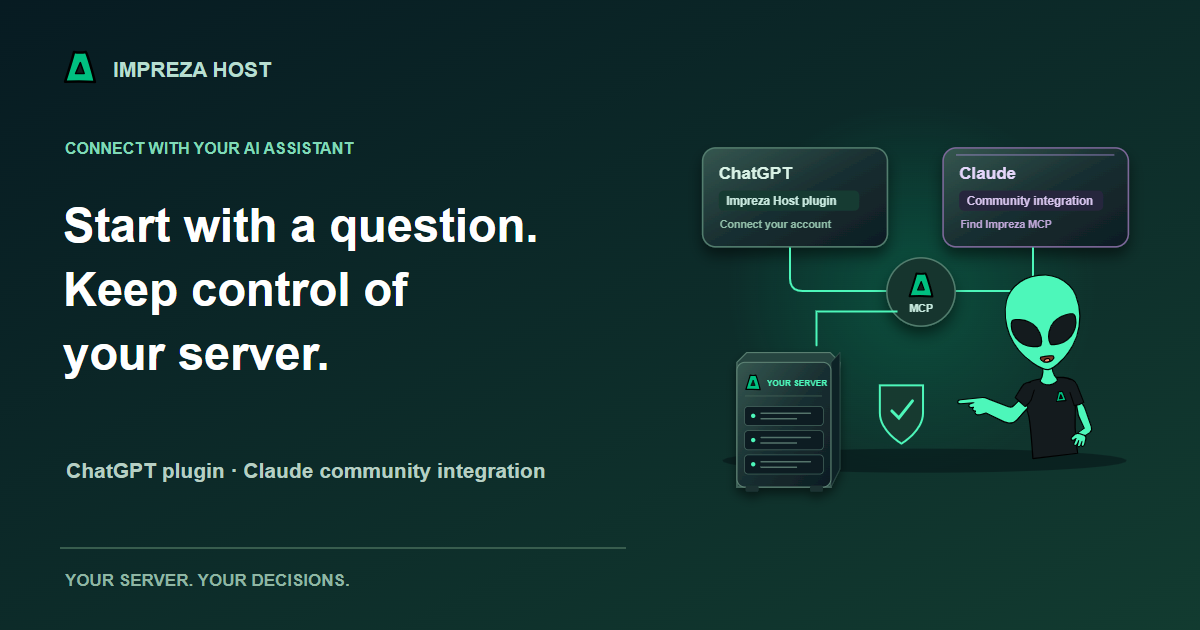
You already use an assistant to explain code or plan a project. Now it can also help you understand and operate supported Impreza resources, through a connection whose access you choose.
Impreza Host is available as a plugin in ChatGPT. You can also find Impreza MCP in the Claude application as a community integration. These are different connection paths: review the available actions and consent for the entry you use.
List my connected servers and applications. Explain anything that needs attention, and suggest the next checks. Do not change settings, deploy, resize or buy anything.
A first inventory helps your assistant work with the resources that actually belong to your account. It also lets you check the connection before granting access for a specific change. An offline server or missing measurement should remain unknown, rather than becoming a confident health claim.
For ChatGPT, open the Impreza Host plugin and follow its account-connection flow. In Claude, look for Impreza MCP among the community integrations. The Claude application entry is separate from the local setup for Claude Code.
A client that supports custom remote MCP connections can use the hosted Impreza endpoint and OAuth consent. A local MCP installation is useful for supported local-project workflows. Follow the connection guide for the path you choose; do not paste your account password or recovery code into a prompt.
You can start with an Impreza VPS or connect a compatible server you administer at another provider. The Impreza Agent adds supported app operations to that machine while you keep the underlying hosting relationship.
Adding the Agent does not import every existing website or database. Connect and verify the server first, then plan any application migration separately. An eligible Impreza VPS ordered with No app offers Agent installation from its service page; an external machine uses the portal-generated installation command.
Depending on the integration, permissions and server capabilities, your assistant can help inspect deployments, review logs, plan supported app changes, inspect backups or explain a capacity recommendation. Projects and environments keep related resources together so those conversations have a clearer starting point.
You decide what access to grant. Use read access for inspection, narrow delegated credentials for a limited task and human approval policies for selected important changes. Where an integration uses external checkout, the customer reviews purchases or resize choices in the portal. An assistant’s proposal is not a completed deployment or payment.
Supported apps can publish to the Tor network, with access controls and Impreza Shield protection where compatible. A Tor-capable MCP client can also reach Impreza’s onion endpoint. Finding the integration inside ChatGPT or Claude does not establish that those applications send their management requests through Tor.
Your chosen AI service can receive prompts and tool results. Keep secrets out of routine conversations, grant the smallest useful access and review returned information before sharing it. Tor changes a network path; it does not hide information you deliberately give to an assistant.
Open Impreza Host in ChatGPT, find the community entry in Claude, or follow the connection guide. Already have a server? Bring it to the Impreza platform and begin with a read-only check.